kelsons flight sim
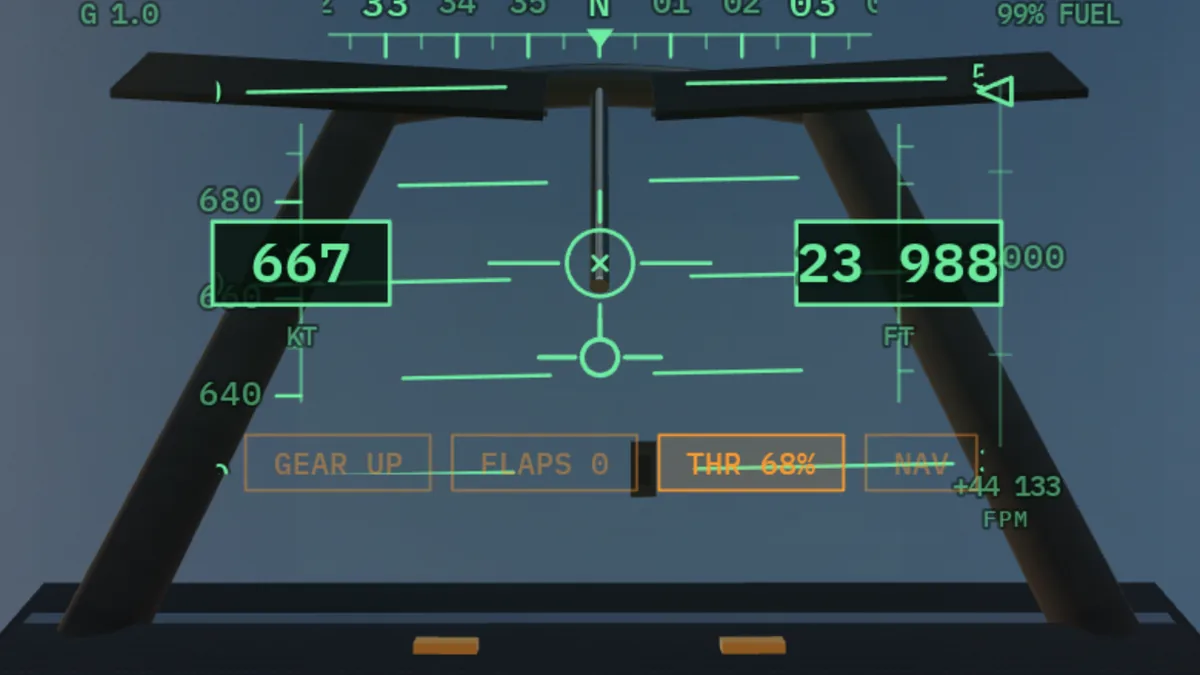
Fly eight aircraft from a light trainer to a widebody airliner, from a real cockpit with a working head-up display over a high dusk cloud deck.
Made by Kelson
About kelsons flight sim
This is a 3D flight simulator played from inside a cockpit with a working head-up display, letting you pick from eight aircraft ranging from a light trainer to a widebody airliner. You take off and fly through a high dusk cloud deck, controlling pitch, roll, throttle, gear and flaps while reading speed, altitude, heading and fuel off the HUD.
- Kind: Simulation, Flight and planes
- Played 32 times
- Published 2026-11-19
- Mode: single player
- Runs in a web browser, on a phone or a laptop. Free to play.
How to play kelsons flight sim
Goal: Keep the chosen aircraft flying under control, managing throttle, gear and flaps as you fly through the sky.
Controls
- Enter or Space: start flight from hangar
- W A S D: pitch and roll the aircraft
- Q E: yaw control
- Z X: throttle control
- Arrow keys: additional flight control input
- G: toggle landing gear
- F: cycle flap settings
- V: cycle camera view
Your first game
- Press Enter or Space in the hangar to start the flight
- Use W A S D to pitch and roll the aircraft
- Use Q and E for yaw, Z and X for throttle
- Press G to toggle landing gear and F to cycle flaps
- Press V to change camera view, M for menu, H for help, R to reset the flight
FAQ
What kind of game is kelsons flight sim?
It is a single-player 3D flight simulator where you pilot planes from inside a cockpit equipped with a working head-up display.
How many aircraft are available to fly?
You can select from eight different aircraft, ranging from a light trainer to a widebody airliner.
What information does the head-up display show?
The HUD displays flight readings including speed, altitude, heading, and fuel level, as well as indicators for throttle, flaps, and landing gear.
What are the flight controls?
Use W, A, S, and D to control pitch and roll, Q and E for yaw, and Z and X to adjust throttle. Press G to toggle landing gear, F to cycle flaps, and V to change camera views.
More simulation games
- Realistic Fishing
- Big Laundry
- Gravel Rally World 1.0
- Gas Station Tycoon
- Fishcremental
- SHOPPING MADNESS: MISSION SAVE MATH CITY!
- Estationers
- Low Poly Simple Airport 2027 Year
- Teleoperator Airport Town
- Salamis Trireme
- Earth Impact - Astronaut View
- Yankee Pest Control